Write, run, and
debug tests in Unity.
Stop hand-running tests and shipping bugs you could've caught. Your coding agent writes, runs, and debugs Unity tests — breakpoints, live state, multiplayer included — and you step in only when it counts.

Write, run, debug.
Three problems — flaky runs, slow loops, blind debugging — one tool. MooseRunner lets your coding agent and you write tests, run them reliably, and see exactly what broke, so bugs get caught before they ship.
Write tests
A toolbox of helpers for authoring tests — scene loading, persistent-object tagging and cleanup, and above all first-class multiplayer harnesses and async (UniTask · Task · coroutine) support.
See howRun tests
Stable, predictable state managed Play Mode execution — any order, any speed, even parallel multiplayer instances synced to one clock.
See howDebug tests
Your agent attaches a real debugger — breakpoints, stepping, live state — plus a unified multiplayer log and an AI visual-analysis pass that gives it eyes.
See how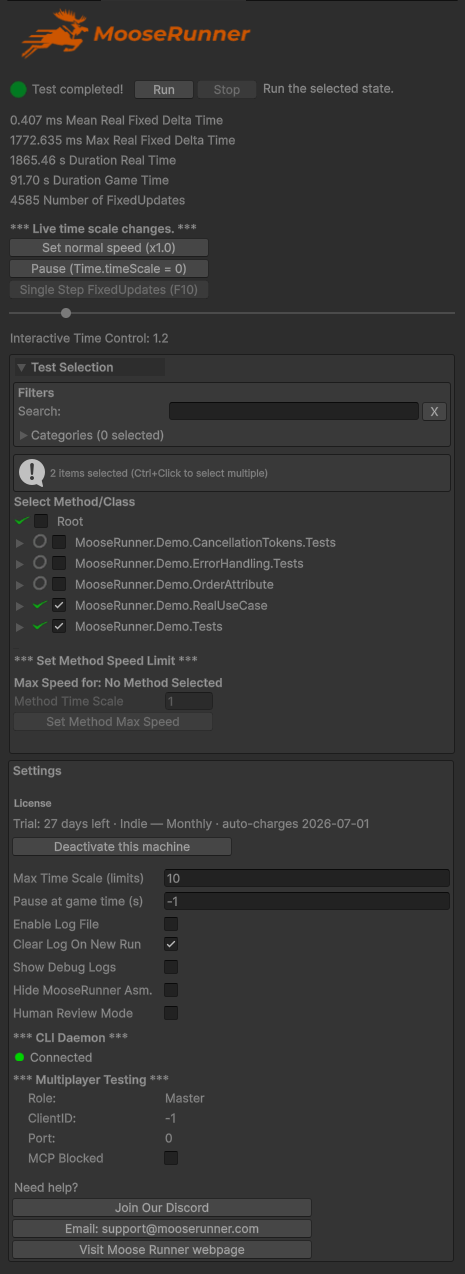
The human side.
Everything on the left ships today — a docked inspector a human drives by hand, and a CLI the agent drives. Two surfaces, same result.
One click runs the selected Play Mode tests — or your agent triggers them and reads the result back.
Drag the time scale live, set a per-method time scale, or single-step fixed updates one frame at a time.
Run a group of tests, control-click individual methods, and run the exact subset you need — again and again, without leaving Play Mode. (Supports Hot Reload.)
Save your code and the selected test re-fires instantly. The tightest possible edit-run loop.
Real timing metrics, captured every run — numbers an AI agent can assert against deterministically.
One paste into manifest.json.
Four steps — and only one is yours to do by hand. Your agent handles the rest.
- 1Paste the block into
Packages/manifest.json— your agent can do this for you. - 2Open the project in Unity and let Package Manager resolve. The package and the
mooserunnerClibinary only exist after this. (Window → Package Manager forces it.) - 3Enter your license key — your one manual step. Open Tools → MooseRunner → Open MooseRunner and paste your key, or start the 30-day trial. Required before any test runs.← you
- 4Hand off to your agent point it at
./MooseRunner/mooserunnerCli setup. It isn’t on PATH — it lives atMooseRunner/mooserunnerCliin your project. The agent asks you a few questions and then runs setup and configures prerequisites, guideline docs, and samples from there.
On Unity 6.3+ a one-time “Missing Signature” notice for scoped-registry packages is expected — click Close.
↳ No license key yet? Start the 30-day trial.
Tests your agent can actually write.
MooseRunner gives the agent a harness of well-structured helpers — multiplayer rigs, async support, scene setup and cleanup — so it authors real tests fast. You review and steer; the agent does the typing.
Multiplayer test harness
Spin up a master and clones, sync their clocks, and assert across instances — the hardest tests to write by hand, made first-class.
Async, your way
UniTask, standard Tasks and coroutines are all first-class, so generated tests match how your codebase already works.
Scene loading, tags & cleanup
Load any scene by name, tag persistent objects to survive a run, and tear everything down cleanly between tests.
Stable, repeatable test execution.
Play Mode tests that just run — no Edit-Mode round-trip, in any order you want. Because nothing else matters if the basics don't work.
Stays in Play Mode
Run test after test without forcing a jump back to Edit Mode between each one.
Any order, grouped
Group tests, control-click to select methods, and run exactly what you need.
Async, your way
UniTask, standard Tasks, and coroutines — however you write async, it's handled.
Hot Reload aware
Understands the Hot Reload plugin and transitions correctly on reload events.
Auto-rerun on save
Save your code and the selected test re-executes instantly. Tightest loop possible.
Clean, repeatable
Results an AI agent can trust — the same run, the same way, every time.
Test multiplayer like it's single-player.
Parallel Unity instances, synchronized time, and assertions that target specific clones from the master — all reporting into master and one unified log for debugging.
Inspect at any speed.
Slow time to a crawl to catch a blink-and-miss bug. Fast-forward past setup. Or single-step fixed updates one frame at a time.
Your agent gets a real debugger.
Reading logs is guessing. With the debug_* commands the agent attaches to the live Unity editor, sets breakpoints, steps line by line, and inspects real state — no human at the keyboard.
Breakpoints & stepping
Set breakpoints by file:line, step into / over / out, break on exceptions. Every stop comes back with a numbered source window — exactly what an agent needs to reason about.
Evaluate live state
Locals, this, private field chains, statics, even method calls — evaluated in the running editor, watchdog-protected. The agent reads the actual value, not a guess from logs.
100% local, no API key
Pure CLI talking to Unity’s built-in Mono debugger over loopback. Nothing leaves your machine, nothing to configure — and it’s an optional component, so everything else runs without it.
Give AI eyes.
Some bugs are purely visual — wrong animation, wrong position, movement that just looks off. Record the run, tag objects, and let a second AI describe exactly what it sees.

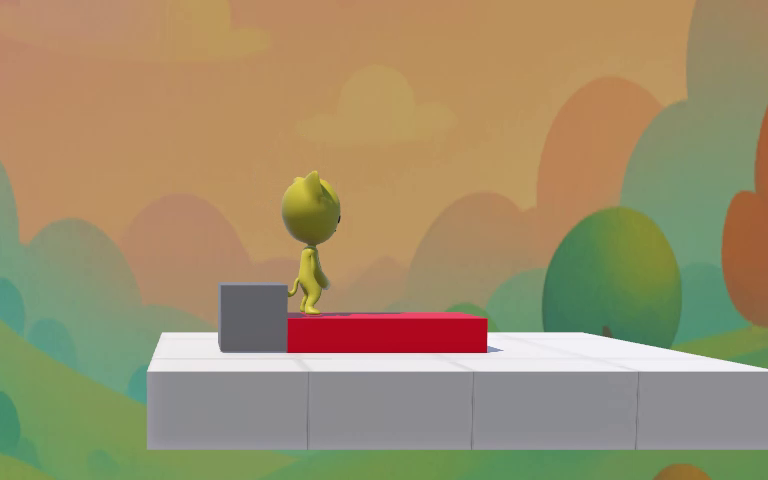
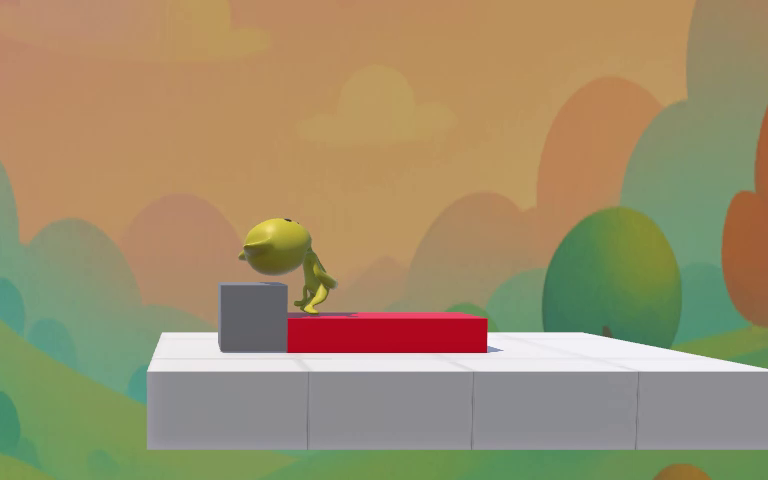


“The character collapses face-down onto the red object. By 5.6s only the upper torso is visible above its surface — the rest has clipped through. At 6.8s the character is gone entirely; no falling animation, no despawn effect. Likely a collision-volume mismatch.”
Depth beyond the headlines.
Simple, per-seat pricing.
AITDDCard required to start the trial. No charge for 30 days; auto-renews on day 31 unless cancelled. Indie requires a checkbox attestation that annual revenue is below $200,000 USD.
Two reasons: iteration speed and agents. Authoring and iterating on tests in Unity’s built-in Test Runner is slow and fiddly — the edit-run loop drags. And it isn’t agent-native: there’s no clean way for an AI coding agent to run tests and read results back, so driving it from an agent is a constant fight. MooseRunner adds a structured authoring harness and a CLI the agent drives directly — fast for you, native for the agent.
Try free for 30 days.
Write, run, and debug Unity tests with your AI agent. Indie from $20/mo, studio $89/seat — 30 days free.